Review Comments (0) Screenshots (7) Questions & Answers (0) Votes (0) Awards (4) Wiki  
2.5.71
www.aleesoft.com
Freeware
594 people
Download Aleesoft Free iPad...

6.67 MBDownloaded 499 times

This software was checked for viruses and was found to contain no viruses.
Click here to see antivirus report.
 

Review

This is official description

Aleesoft Free iPad Video Converter is a wonderful simple and easy iPad video converter. It can convert almost all video formats to iPad which lets you enjoy watching any video on your iPad anywhere and anytime.
High Definition video to iPad
Convert high definition video such as HD TS, HD AVI, HD WMV, HD MOV, HD MPG, HD MKV, HD MP4 to iPad HD video. Support conversion in batches to save your time.
Crop video frame size, split into segments, merge files and adjust output setting in terms of your preferences.
Input format:
AVI, MPEG, TS, OGM, MKV, WMV, MOD, MOV, MP4, 3GP, MPG, ASF, FlV, VOB, WMA, M4A, MP3, etc.
 
The following review written by one of the Software Informer contributors applies to version 2.3

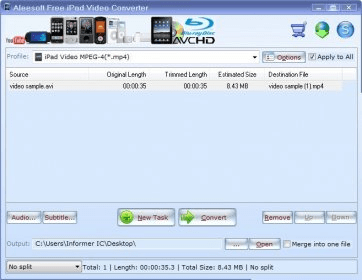
Aleesoft Free iPad Video Converter is a multi-format video converter. The application can open pretty much any video file and convert it to a variety of other formats. For a free tool, this converter has a lot of features and support for a lot of formats. The one feature that caught my eye was subtitle support. If you have a video file with SRT subtitles, you can add the subtitles and they will be hard-coded to the video, so that you can enjoy them on your iPad. Aleesoft Free iPad Video Converter can also copy files from a Blu-ray movie path and use them as input, so it kind of doubles as a movie ripper as well.

In terms of design, although it looks a bit generic, the application has a very simple design, which makes it intuitive.

In my testing, I used two different files. First I used a standard DIVX .AVI file, which I converted to the iPad HD Video profile. No problems found. The quality was OK and the conversion speed was on par with other converters. I then tried an MKV file, just to be thorough. The video was great but the audio was all messed up. I don't blame the application, though, MKV is one of the toughest formats out there and apps are just now starting to get MKV conversion right.

All in all, this is a nice converter which has quite a few interesting features. It has several different conversion profiles, both for iPads and other devices. It works well enough with most formats.
  • Good user interface.
  • OK conversion quality.
  • OK format support.
  • A few problems with some formats.

Reviewer rating:

Reviewed: Last year

Report a wrong version Report a wrong program title Suggest a correction

Screenshots

Main window Main window Aleesoft Free iPad Video Converter Aleesoft Free iPad Video... Main window Main window Profiles Profiles
All 7 screenshots

Latest comments


There are no comments, be the first one!
Add new comment

E-mail Address:

Password:

Register now »

Forgot password?

Sign in with:
Facebook Account
Download Software Informer Client
Copyright © 2012, Informer Technologies, Inc. About| Terms & Privacy| FAQ| Feedback & Support| For Developers